
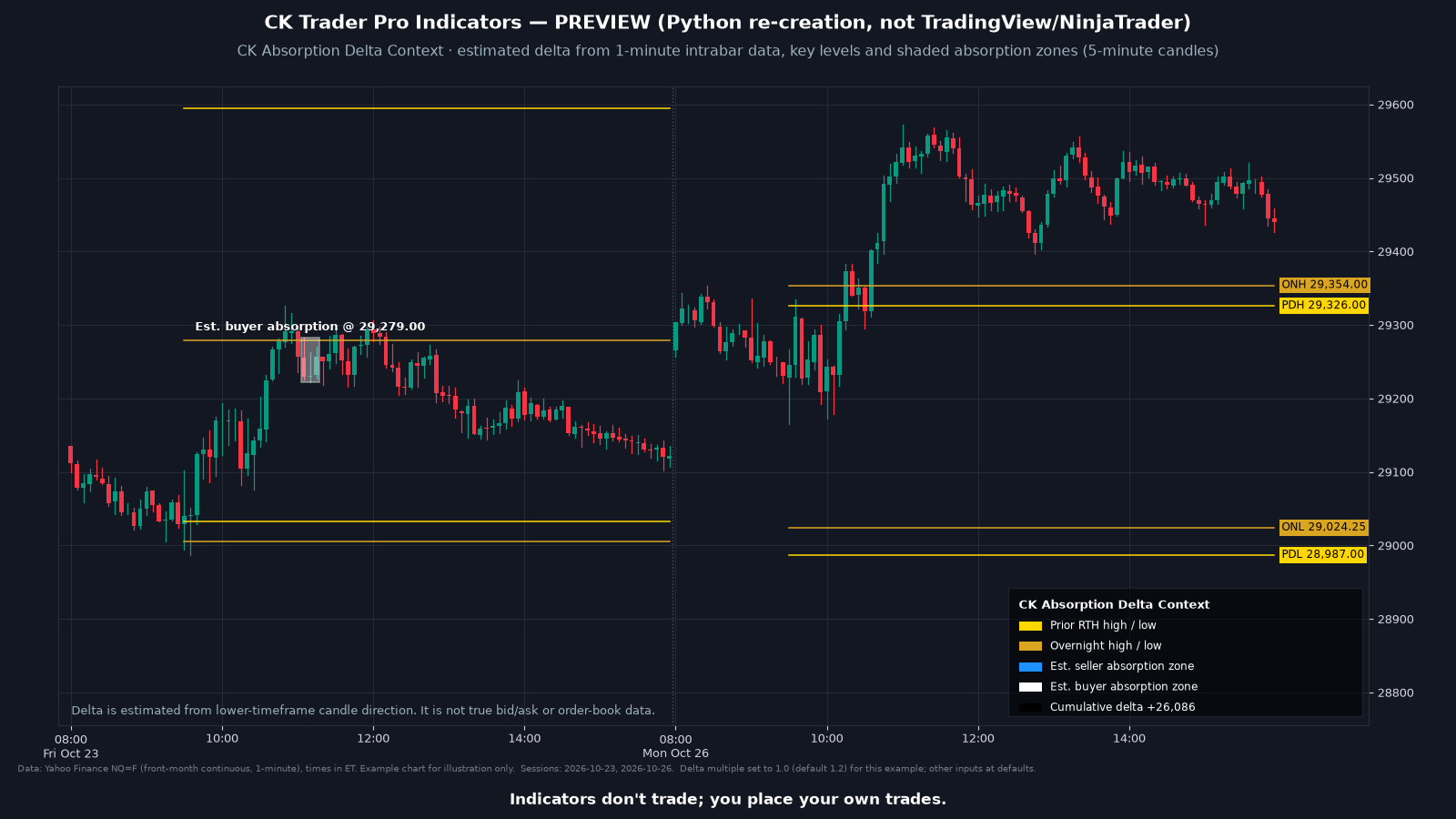
CK Absorption Delta Context
Estimates how much volume traded on each side for every bar from a finer intrabar series, then shades a zone where an unusually large amount of one side's volume traded at a key level without moving price much. Zones are labeled Est. seller absorption and Est. buyer absorption. Indicators display information only and never place orders.
Delta is estimated from lower-timeframe candle direction. It is not true bid/ask or order-book data.
Zone labels are Est. seller absorption and Est. buyer absorption.
These indicators never place orders. The trader always has the last say.
What it draws
- Zones labeled Est. seller absorption.
- Zones labeled Est. buyer absorption.
- A zone is shaded when, over a short window of bars (3 by default), the absolute delta and the volume are at or above set multiples of their recent 20-bar averages, a set share of the absorbed side's volume sits in the wicks, price moved no more than a set number of ticks (12 by default), and the window is near a key level (within 16 ticks by default). Zones are spaced apart (5 bars by default) so they do not stack.
- Key levels it watches: the prior regular-session high and low, the overnight high and low, and up to three levels you type in. It also keeps a running cumulative delta in the legend, and can show a delta number on each bar (off by default). Colors are adjustable.
Settings
- Intrabar series (1 tick, 1, 5 or 15 seconds, or 1 minute; default 1 second), level tolerance in ticks, three manual levels, the absorption window and thresholds, minimum bars between zones, zones in regular hours only, cumulative delta from 6:00 PM ET or 9:30 AM ET, and what to show: levels, zones, delta numbers, legend. Colors are adjustable.
- Zone labels stay Est. seller absorption and Est. buyer absorption.
Install
- Use the download link in your email. Don't unzip the file.
- In NinjaTrader 8: Tools, Import, NinjaScript Add-On.
- Select the .zip and finish the import.
- Add the indicator to a chart and sign in to NinjaTrader with the account email the license will use.
FAQ
Do the indicators place trades?
No. These indicators never place orders. The trader always has the last say.
Which platform does this work with?
NinjaTrader 8 on Windows. It does not work with NinjaTrader 7. You need your own NinjaTrader account, brokerage connection and market data.
Is this real order-flow data?
No. Delta is estimated from lower-timeframe candle direction. It is not true bid/ask or order-book data. You need intrabar data (tick or second) from your data provider for the period you load.
Requirements
| Platform | NinjaTrader® 8 (8.1.5.0 or later for account-email licensing) |
| Operating system | Windows, as required by NinjaTrader 8 |
| License | One license per person, tied to your NinjaTrader® account email. Lifetime or Monthly. See the Indicator License Agreement. |
| Data | Market data is not included. You need your own market data feed that works with NinjaTrader. |
| Delivery | Your download link is emailed to you within 2 business days of purchase, and your license is added to the NinjaTrader® account email you entered at checkout. |
Indicators don't trade; you place your own trades.
This is a charting and educational tool. It does not trade for you and is not trading advice. Every customer gets the same indicator; it is not personalized and does not know your account, goals or risk.